Currency tracker
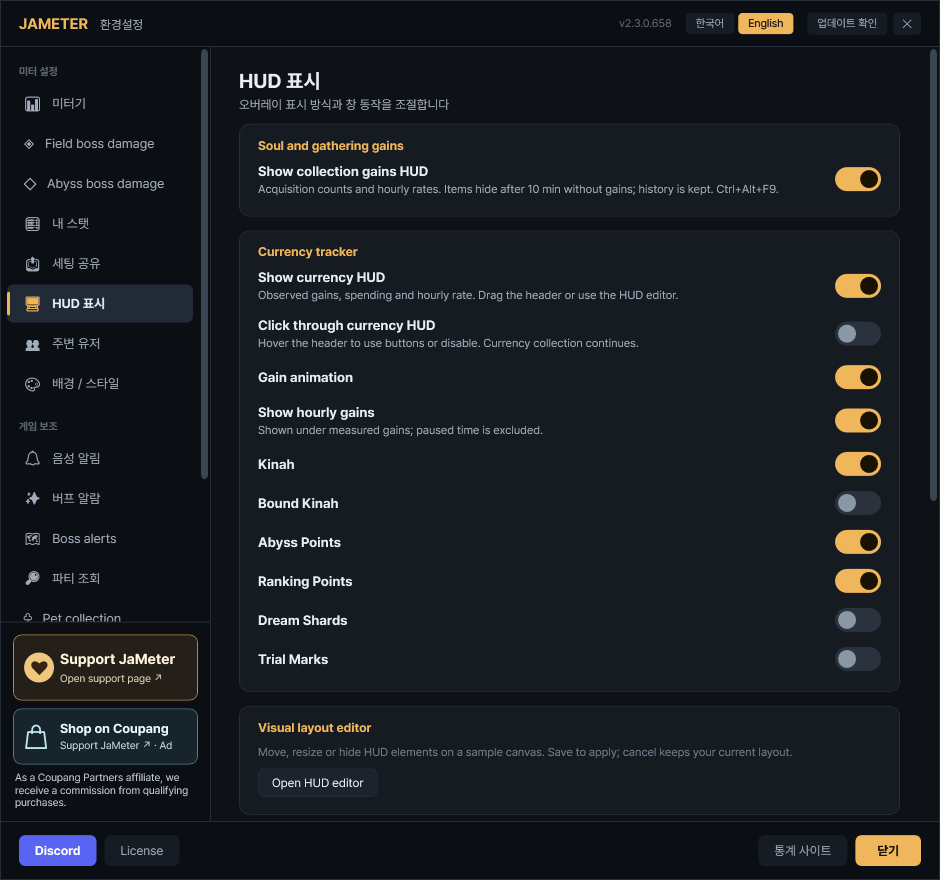
Settings → HUD display → Currency tracker
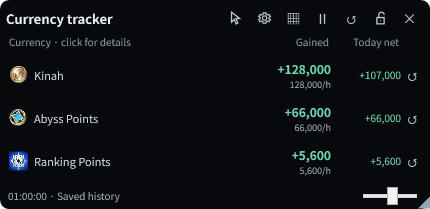
Track Kinah, Abyss Points and Ranking Points in a separate HUD.
- Toggle: Ctrl+Alt+F2 by default.
- Default rows: Kinah, AP and Ranking Points. Enable Bound Kinah, Dream Shards and Trial Marks in the same settings.
- Gained: Your current measurement; the smaller number below is the hourly gain rate.
- Today net: Today’s gains minus spending/decreases. It can be negative.
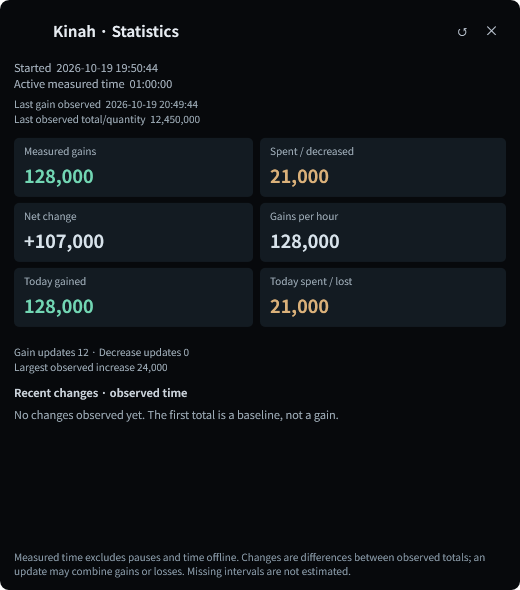
- Click a row: View start time, active duration, gains, spending, hourly rate, today’s totals and recent changes.
- Row ↺: Reset only that currency’s current measurement. Other currencies, today’s totals and calendar history stay intact.
New installations show the HUD near the bottom right. Existing visibility and placement settings are kept.
Soul and gathering gains
Settings → HUD display → Soul and gathering gains → Show collection gains HUD
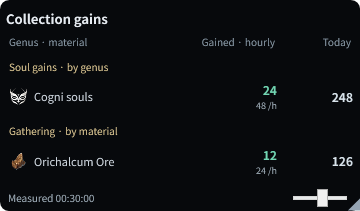
A separate activity tracker, alongside the pet growth list.
- Toggle: Ctrl+Alt+F9. This HUD starts off; enable it when needed.
- Souls: Group supported observed acquisitions by genus, separately from pet growth/ownership status.
- Gathering: Each material shows measured gains, hourly rate and today’s accumulated gains. Purchases and storage transfers are not counted as gathering.
- 10-minute cleanup: A genus/material hides after ten minutes without a new gain. A new gain brings it back with its totals preserved.
Auto-hide only cleans up the display. Measured totals, today’s totals and dated history are kept.
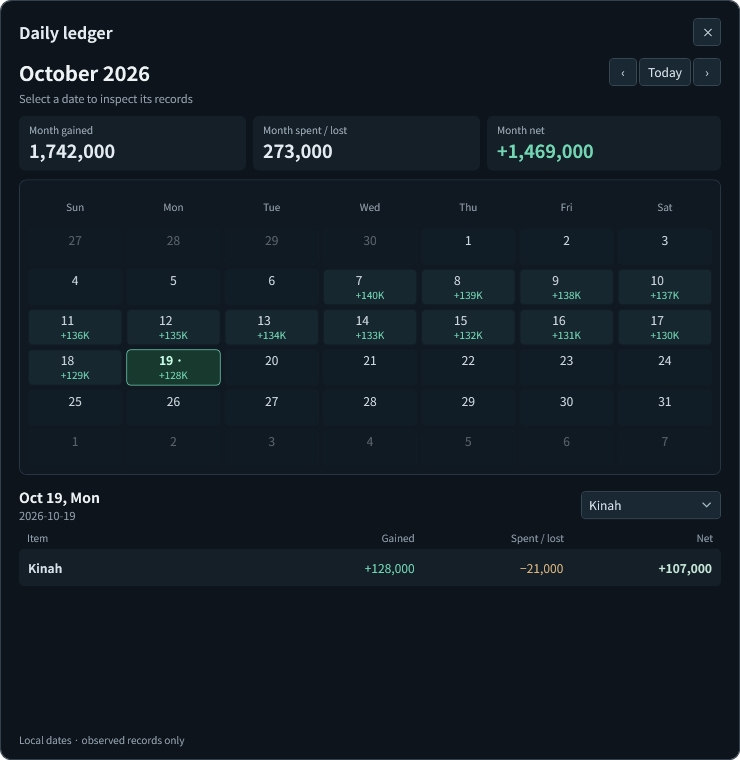
Today totals and daily ledger
Hover the currency or collection HUD → calendar button
Current measurement, today’s total and calendar history have separate roles.
- Current measurement: Reset it manually to begin a new measurement.
- Today total: Starts over when your PC’s local date changes. A manual measurement reset does not clear it.
- Calendar: Select a date for per-item gains, spending/decreases and net. Navigate with Today and the month arrows.
- Item filter: Select a currency, genus or material for its monthly gains, decreases and net. Hover the summary values for totals across all retained dates.
History is saved locally per character. Empty dates mean no observed records, not zero earnings. Previous gameplay is not reconstructed; oldest days roll off at the storage limit.
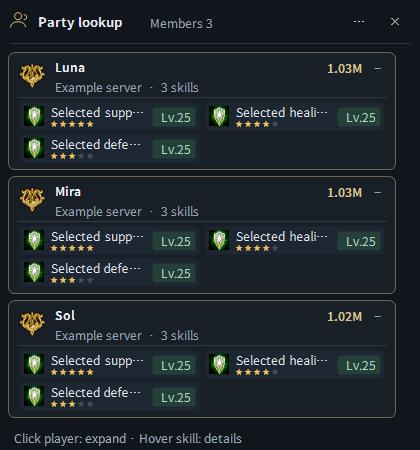
Whole-party skill lookup window
Meter menu → Party skill lookup / Default shortcut Ctrl+Alt+P
View your current party members together and compare their configured skills, levels and importance.
- Open manually: Select Party skill lookup in the meter menu or press Ctrl+Alt+P. Press it again to close.
- Open automatically: In Settings → Party lookup → Display, enable party lookup when joining a room and/or party lookup when viewing character information.
- Choose skills: In the class tabs of the same settings page, select skills, minimum levels and importance (1–5 stars). Only configured skills are displayed.
- Member cards: See each member’s name, server, combat power, selected skill icons, levels and importance stars. Cards start expanded; click a name to collapse or expand.
- Skill details: Hover a skill for its detailed tooltip.
- Size and placement: The window grows or shrinks with its member cards and scrolls for larger lists. Drag empty space or use its separate Party lookup element in the HUD editor.
- Roster cleanup: Stale cards clear when leaving the room or when the current party roster changes.
The image below is the whole-party window, separate from applicant popups. It uses confirmed live party membership; unsupported character information may remain unconfirmed.
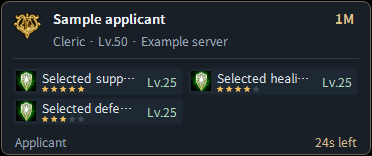
Party applicant cards
Settings → Party lookup → Display → Applicant / character information cards
A separate popup for quickly checking an applicant or inspected character.
- Contents: Configured skills, levels, importance stars and time remaining until closing.
- While reading: Hovering the card pauses its closing timer.
- Cleanup: Confirmed acceptance, rejection or cancellation removes the matching applicant card.
Use the whole-party window above to compare your current party members together.
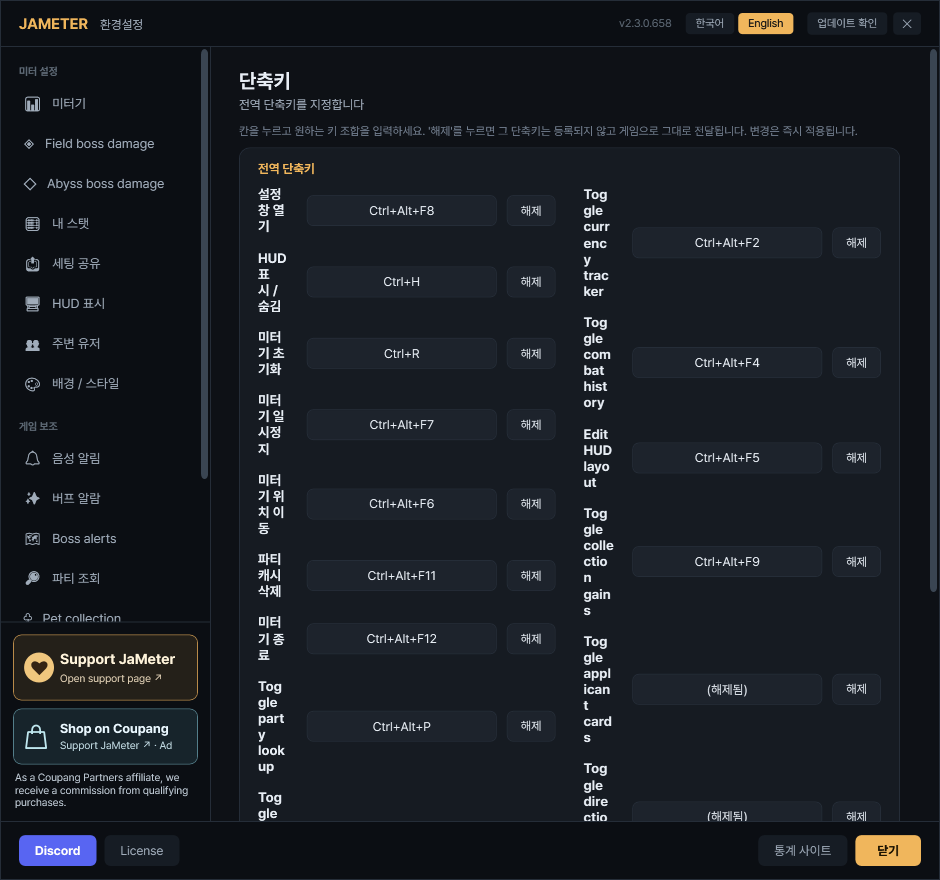
Shortcuts, placement and appearance
Settings → Hotkeys / Settings → HUD display → Open HUD editor
Click a shortcut field and press your preferred key combination.
- Pets Ctrl+Alt+F1 / Currency Ctrl+Alt+F2
- Collection gains Ctrl+Alt+F9 / Party lookup Ctrl+Alt+P
- HUD layout Ctrl+Alt+F5 / Combat history Ctrl+Alt+F4
Drag unused HUD space to move it, use its resize handle and position lock, or arrange supported elements in the HUD editor.
Currency controls appear on hover: click-through, settings, pause and reset. Hover its title to operate controls while click-through is enabled.
New default background opacity for pet, currency and collection HUDs is 60%. Existing saved values are preserved.
Fixes and reliability
- Improved pet soul quantities after stage advancement and consumption.
- Fixed boss importance colors not persisting after reopening settings or restarting.
- Fixed alternating demo and live combat overlays.
- Fixed overflowing skill names, tooltips hidden behind cards and distorted layout previews.
- Improved configured-skill filtering, importance display and lookup waiting/retry behavior.
- Improved tracking continuity through travel and dragging after edge snapping. Placement can extend into the taskbar area.
- Improved duplicate/missed acquisition handling and saved-history restoration.
Tracking note: An unconfirmed first gain is not invented. Ranking Points may follow the game’s own update timing. Complete coverage of every reward source is not guaranteed.